Team Portal
Resources and guides for the SUPERJUMP team.
Staff Access Only
This area is for SUPERJUMP team members only.
Enter the staff password to continue.
Incorrect password — please try again.
Getting started
If you are viewing this page, it means you're already on our Discord server. The next step is to set up an Author Profile:
- James (#kuribojim on Discord) will send an invitation email to your designated email address. If you haven't received this link, please DM James.
- The email invitation contains a link that guides you through a self-service process to setup your Author Profile.
- Make sure to fill out your Author Profile completely, including a description you are happy for the public to read, and a good quality custom avatar.
- Now you're done! Easy.
Story exclusivity
Before we move on, please note that all stories published on SUPERJUMP must be exclusive to SUPERJUMP.
We do not place any restrictions on you working with other publications, so please feel free to work on your own publications, undertake freelance digs, and so on.
Story exclusivity is a critical tool for us to build an audience around our unique value proposition. Please check in with James if you have any questions about this.
Using Ghost
Signing In
Once you have set up an Author Profile, you can access the Ghost CMS (Content Management System) at any time by clicking on the Team Login link on our homepage (found in the global nav at the top). We recommend bookmarking this for easy access in future.
You can also use this button:
Starting a new story
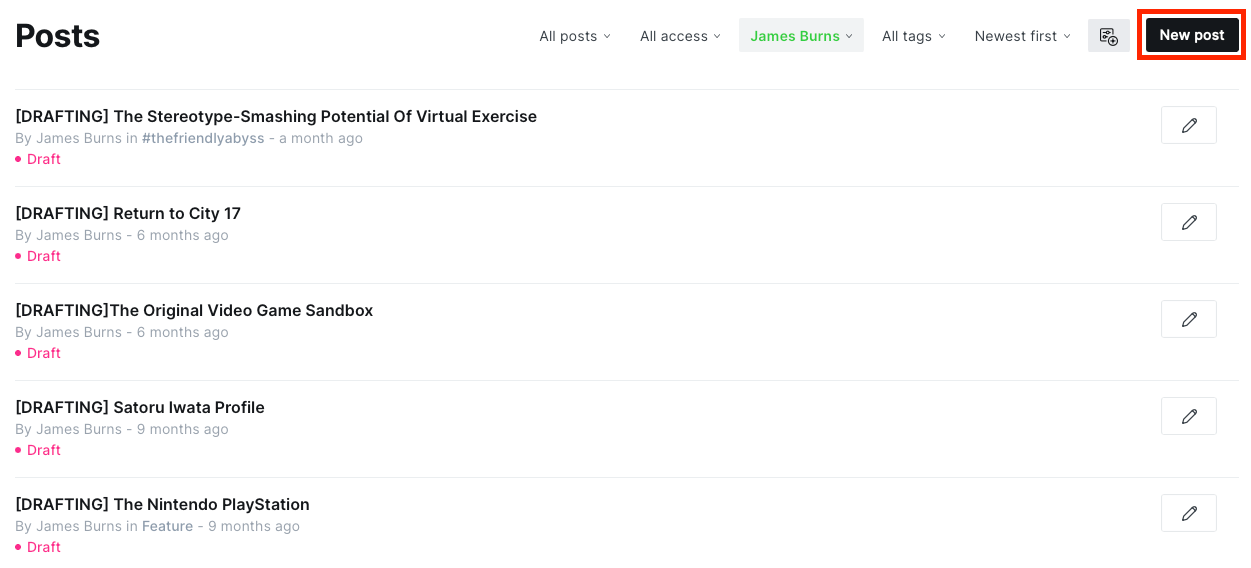
When you sign in, you should see a page that contains all of your posts. The filters at the top of the screen enable you to view your drafts, published posts, etc...
Simply click on New post when you want to create a new draft.
Editing tools
Creating and formatting stories in Ghost is super easy.
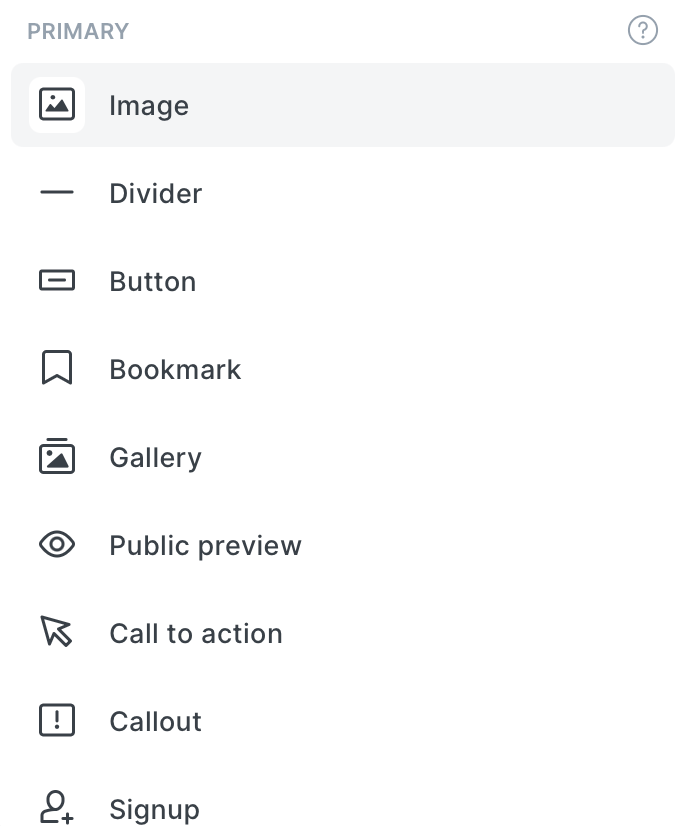
In the screenshot below, you'll see a little example of a few kinds of basic formatting. If you want to access a richer set of tools (enabling you to create Callouts, Image Galleries, and more), just type the forward slash key (or click the + button that appears next to your cursor) to bring up a tools menu:
Click the button below to check out Ghost's official guide:
Editing images
One of Ghost's coolest features is the ability to edit images directly in Ghost CMS without needing separate tools or fancy Photoshop skills.
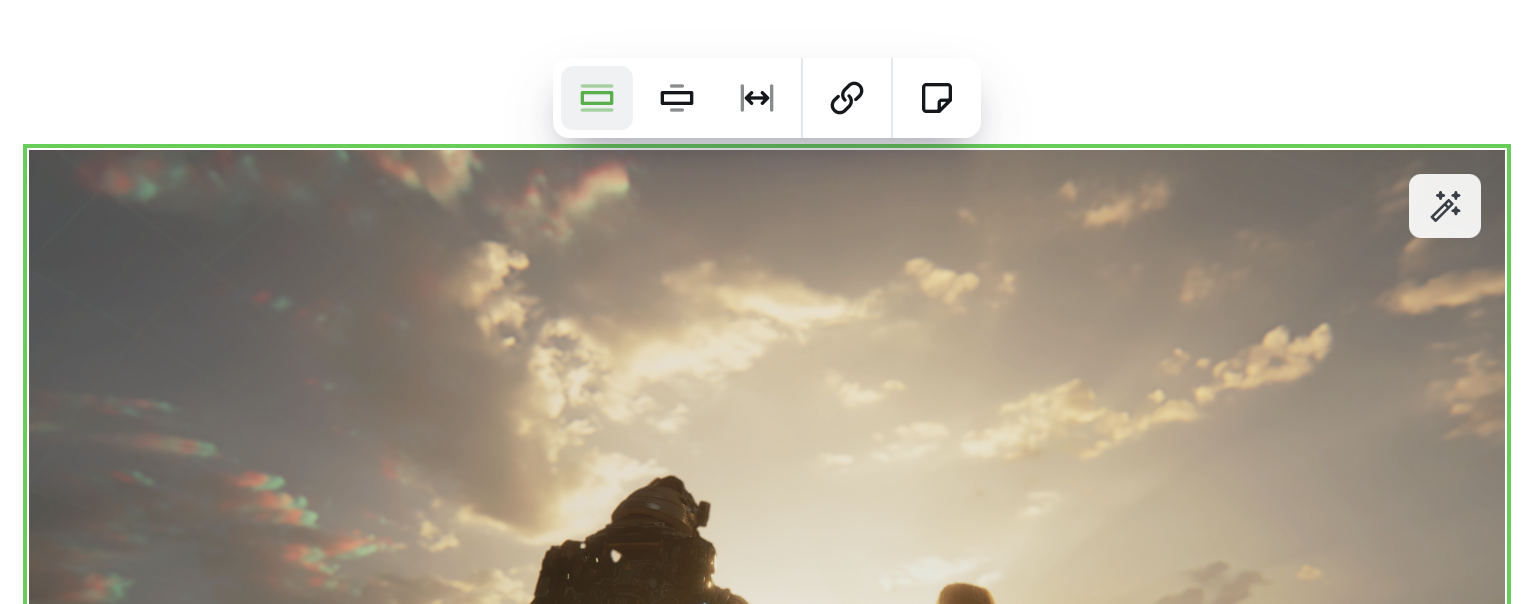
When you upload an image, click/tap on it and you'll see a few options appear. The tooltip that appears at the top allows you to set the image size on the page, add a hyperlink, or save as a snippet. The really powerful functionality comes from the magic wand icon on the top right. Click/tap on this and you'll enter a powerful in-house image editing app:
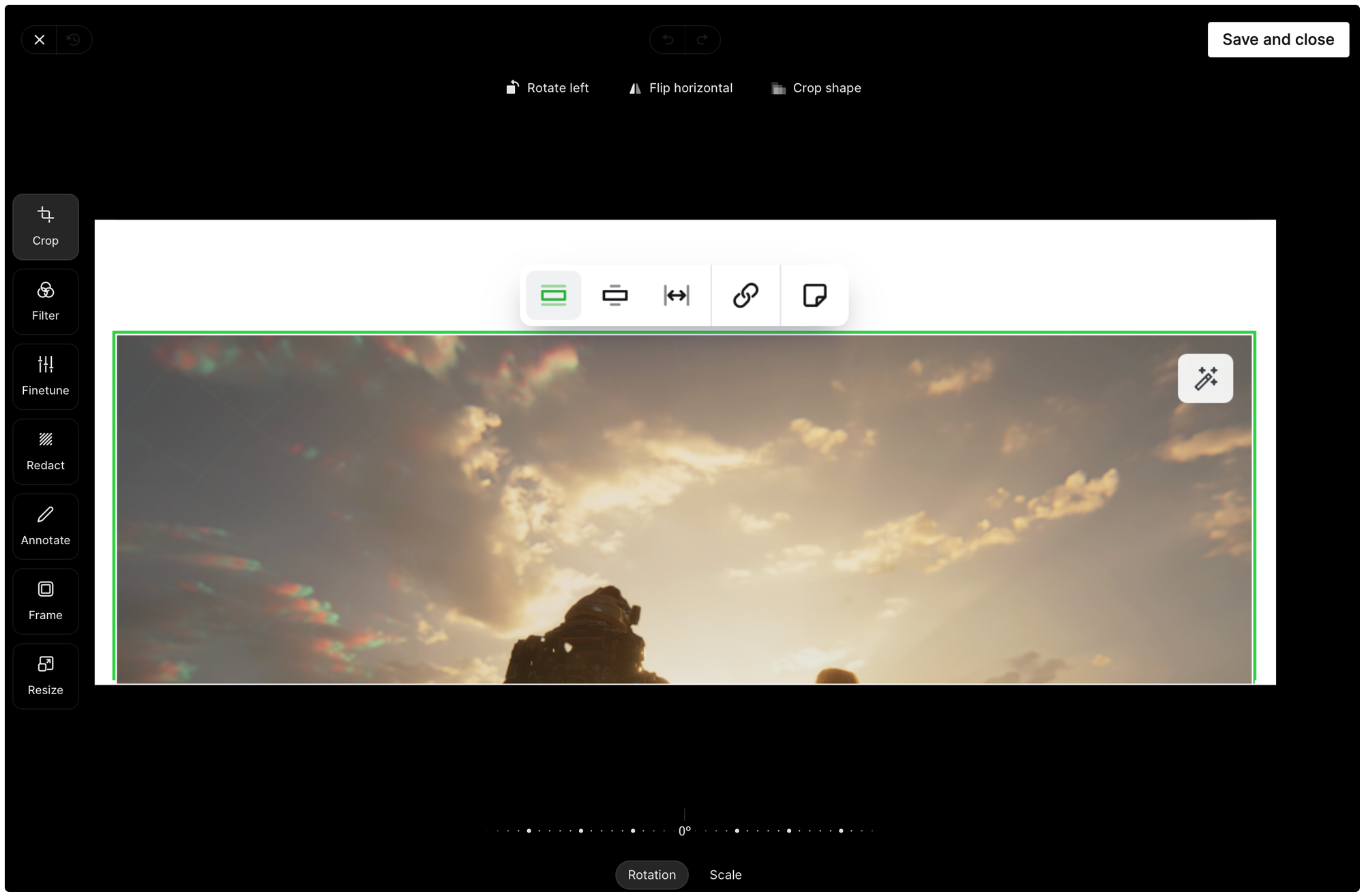
This app allows you to do a really wide range of things with an image. You can do everything from adding filters, cropping/scaling/rotating, adding/changing frames (e.g. if you want lovely rounded corners you can do this) - and so much more! We encourage you to play around with this app to add visual flair to your stories.
Story guidelines
We aren't super prescriptive about how SUPERJUMP stories should be formatted or written in general, but there are few simple guidelines we ask that all authors follow. These are a combination of formatting rules and general editorial rules.
No AI
All stories on SUPERJUMP must be written by humans. There are no exceptions to this rule. You are welcome to use AI tools and systems like Grammarly to help you plot out structure or ideas, to correct your spelling and grammar, and so on - but you must not have AI write stories for you/on your behalf. Our editors periodically use AI detection systems, especially where a story's text appears suspicious, to validate that stories are genuinely written by human beings.
Visual balance
Once you have written your story, we recommend taking a moment to step back and look at its visual structure. Very large bodies of text are unpleasant for readers to work through, so we recommend leveraging the available tools to break up text and build a more pleasurable reading experience. Use tools like:
- Headings and sub-headings
- Quotes/block quotes
- Images
- Dividers
If you're struggling with how to best present your story, don't worry; that's what the Editors are here for - we can help you polish your story so that it's ready for prime time.
Languages
All of SUPERJUMP's stories are currently presented in English. If you are interested in producing a story in a different language, please contact the Editors. It's important for us to ensure we can maintain editorial quality control in these cases - it's not impossible, but might be more or less difficult depending on the desired language.
We support both American and International English. You may use either, but please make sure you stick with one for each story (i.e. the same story should not switch between American and International English).
Console names
Make sure to correctly format console names. For example:
- PlayStation (not Playstation)
- GameCube (not Gamecube)
- Game Boy (not Gameboy)
When in doubt, format the name of a console or video game the same way the publisher does. The exception is for all-caps words that are used frequently in.story (e.g. if you are writing a story about Final Fantasy, don't format it as "FINAL FANTASY" everywhere throughout the piece - this is jarring for readers). If in doubt, check in with the Editors.
What to do before submitting your draft
Before submitting your draft (more on that in the Story creation, editing, and publishing process section below), please:
- Proof-read it yourself (it helps to read your story out loud to yourself to catch sentences that don't flow well, for example).
- Run it through spell check.
Story creation, editing, and publishing process
- When you are thinking about crating a draft, it's worth first checking that it meets our story strength criteria.
- If you're in any doubt, you can either ask the editors for help in the Editor Help channel or you can float your idea to the full team in the Writers Room channel.
- As mentioned in the Starting a new story section above, make sure to put [DRAFTING] in the story title while you're still working on it. This prevents Editors from pulling the story into our editing queue.
- Once you're done and ready for Editors to review your story, you can remove [DRAFTING] from the title and let us know the piece is ready by pinging us in the Editor Help channel.
- Editors will then bring your story into our editing queue (by applying the #editing tag to it). If we have any questions, feedback, or suggestions for you during the editing process, we'll usually either reach out via DM or we'll tag you in the Editor Help channel.
- When stories are finalised and scheduled for publication, they appear in the Scheduling channel.
If a story is declined or requires significant re-work, an Editor will always reach out to you via DM to provide further context and advice. Please note that we decline stories for many reasons; this is usually not an indication that the story itself isn't great, it's typically just that we don't feel the story is the right fit for our publication voice.
Story strength criteria
Deciding what to write can be one of the most difficult challenges for any author. Even if you are a regular contributor to SUPERJUMP, we will not automatically accept every submission. As a general rule, you should always run your story draft through these four strength criteria. Does it satisfy all of them? Bear in mind, we're not expecting drafts to be perfect! But all stories should attempt to meet these criteria. Our editors are here to help you polish up aspects of your story, or to brainstorm ways that your stories can meet these criteria.
💡 Is this story innovative? Am I approaching the topic from a unique angle - perhaps one that hasn’t been widely discussed before? If there are many other stories (even on SUPERJUMP) with the exact same angle, then maybe this isn’t the right path.
💡 Is it interesting? Would readers actually want to read this story? Does it present new or interesting information? Is it a pleasure to read? Is it well-worded, or witty, or humorous, or thought-provoking?
💡 Is it insightful? Do I come away from this story having learned something new? Or maybe I discovered a new way of looking at an existing topic?
💡 Is it quality? Have I proofed this story myself before submitting for editing? Am I happy with the spelling, grammar, and structure?
In addition to these four principles, make sure that your piece aligns with the SUPERJUMP DNA. If you have an idea but you aren’t sure how to approach it, or you have a draft but you’re in doubt about its story strength, feel free to reach out to the Editors via the Editor Help channel. It's always best to put your query/request in there (rather than DMing a specific editor) just to make sure someone can look at it.
Images and artwork usage policy
SUPERJUMP is headquartered in Australia, so we adhere to Australian copyright law (including "fair dealing" provisions). Please follow this guidance in relation to image use:
Video game screenshots and artwork
These kinds of images should be sourced from (in rough priority order):
• Official developer/publisher press kits.
• Official Steam pages or developer/publisher web sites.
• Screen/video captures taken by a member of the SUPERJUMP team.
• Copyright-free sources (for example, Wikimedia Commons or Bing Image Search where "All Creative Commons" is selected).
Non-video game images (e.g. photos of real people, places, etc...)
These kinds of images should be sourced from:
• Unsplash (in the Ghost Editor, type "/unsplash" to pull up the integrated Unsplash gallery).
• Other copyright-free sources (for example, Wikimedia Commons or Bing Image Search where "All Creative Commons" is selected).
• Photographs taken by a member of the SUPERJUMP team.
Use of AI-generated images
Please do not use AI technology to generate images whole cloth. AI tools can be used for minor editing tasks on existing images (this can be hard to avoid with modern tools anyway), but please bear in mind that we also have some embedded image editing capabilities in Ghost (as mentioned above).
Image resources
Here are a range of image resources you can use for your stories. I've tried to assign these into logical groupings to make it easier. We will add to this resource list over time.
SUPERJUMP brand assets
Contains:
• SUPERJUMP branding assets (logos, proprietary artwork).
• SPOILERS image.
• Stock artwork created by the team for use on SUPERJUMP.
• Screenshots and videos created by the team for use on SUPERJUMP.
Video game hardware
Contains:
• High-resolution, copyright-free images of video game hardware.
Stock photos
Contains:
• Various copyright-free stock photos.
Unsplash: While in the Ghost Editor, type "/unsplash" (without quotation marks).
Wikimedia Commons: https://commons.wikimedia.org/wiki/Main_Page
Bing Image Search (remember to filter by "All Creative Commons"): https://www.bing.com/images/feed
Press kits
Contains:
• High-resolution official visual assets for press use.
| Publisher | Portal URL | Username | Password |
|---|---|---|---|
| Bethesda | press.bethsoft.com | editors@superjumpmagazine.com | Kopryd-8dofmo-gemkyf |
| Capcom | press.capcom.com | superjumpmag | ;4/6TR4xm8nW |
| Electronic Arts | eapressportal.com | editors@superjumpmagazine.com | qixsah-deghum-Webve4 |
| Nintendo Australia | nintendo-europe-press.com | editors@superjumpmagazine.com | kozhoZ-hiwcyw-kaddi2 |
| Nintendo of America | press.nintendo.com | superjumpteam | bRPNHA5Fiz1CF9MiijNv |
| SEGA | sega-press.com | editors@superjumpmagazine.com | RRkGVkFkUupb88 |
| Sony (PlayStation) | scee-press.com | jb@superjumpmagazine.com | 1/L2C^8b$iff |
| Ubisoft | ubisoft-press.com | editors@superjumpmagazine.com | e^J8_:;*8932 |
| Xbox | xbox.pxn.world | editors@superjumpmagazine.com | rifrom-jadbyk-moPvi7 |
| Games Press | gamespress.com | superjumpteam | 22Y3G3+Gl+a* |
Support links
To be added.